• Winter Weather Updates

    We are monitoring a winter weather system that will impact university operations this weekend and into early next week. 

    • STATUS: All three campuses will close on Saturday, Jan. 24, at 2 p.m. due to forecasted snow, ice and sleet. Campuses will remain closed through Monday, Jan. 26, with remote work and remote instruction on Monday. Essential operations will continue during the closure. NOTE: LR will operate under normal university operations on Friday, Jan. 23.
    • FACILITIES (Hickory): The library and fitness center will be closed Saturday through Monday. The Cromer Center dining hall is expected to operate on a normal schedule unless otherwise communicated.
    • RECEIVE UPDATES: Check LR email and the LR website for official university updates.
    • STAY CONNECTED: If you haven't already, download and enable notifications for the SafeZone app for timely safety alerts and campus information.

    We appreciate your flexibility and patience as we continue to monitor the situation and prioritize the safety and well-being of our campus community.

    Storm Updates

Begin Your Journey

Orientation


Welcome to Lenoir-Rhyne. We are so glad you are joining Bear Nation.

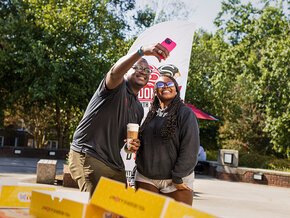
Three smiling students pose for a group photo

We are excited to have you join us for orientation! This is the start of an incredible journey at LR. Get ready to explore, connect and dive into all the amazing opportunities that await you. Let's make these first days unforgettable as you begin your adventure with us.

To help get you started on the right path, click “Step 1 - Start Here” below to verify your account and begin the new student tasks you need to complete prior to your upcoming orientation session.

  • Step 1 - Start Here - Create Your LR Student Account

    Create your LR Student Account by visiting your application portal and downloading your account letter. The account letter provides you with instructions on how to establish your LR Student Account and create a unique password. 

    Follow the “Account Verification Instructions” and utilize the link to your self-service account page to get started. You should log in for the first time using a computer or tablet instead of a mobile phone. 

    Visit Application Portal
  • Step 2 - How to Access the LR Portal

    How to Log On to the LR Portal: Step by Step

    1. Open a new browser and go to the LR website.
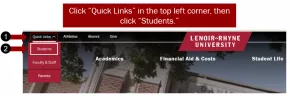
    2. Click the "Quick Links" link in the top left corner of the LR website, then click Students

      Screenshot: Click Quick Links in the top left corner of the LR website and then click Students
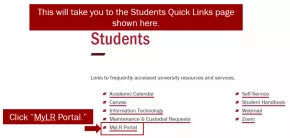
    3. On the Students "Quick Links" page, click MyLR Portal

      Screenshot: On the Students Quick Links page click MyLR Portal
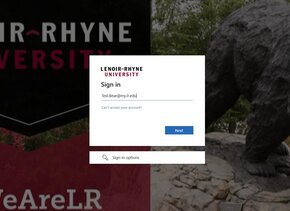
    4. Enter your username and password then click the “Sign In” button

      Screenshot: Type in your user name and password then click Sign In
    5. You will now be on the Portal Home Page. 
  • Step 3 - Mathematics Placement Assessment

    The goal of the Mathematics Placement Assessment is to help you to determine which mathematics course(s) is/are most appropriate for you as you move forward with college coursework. 

    The Placement Assessment is designed to determine what you know and what you need to work on. At the end of the Placement Assessment, you will have a better sense of your strengths and weaknesses in math, and you will have a chance to brush up on topics that you may have forgotten or have not practiced for some time. Read through the following important information.

    Start the Mathematics Placement Test - The link to the placement test is at the bottom of the document.

    Additional Resources

  • Step 4 - Create Your Class Schedule

    Below is a sample schedule for a typical first-year student. As you work through the material, keep track of the courses you are especially interested in taking. You will need the course code to register (three-letter prefix followed by a number, e.g., FYE 100.01).

    1. FYE 100, “First-Year Experience” (3 credits): Required for all first-year students.
      1. If you are in the Fritz Honors College, you need to register for FYE 100H.
      2. If you are First-Generation college student, there is a First-Gen FYE, that is an option to take.
    2. MAT XXX, a math course (3-4 credits): Use your placement test scores to guide you.  Your major may have specific requirements; ask your advisor.
    3. WRD 101
      1. If you have completed the equivalent of ENG 131, you can look for COM 111
      2. If you have completed the equivalent of COM 111, you can look for ENG 131
    4. First Course in Major, if decided (3-4 cr).  If you are not decided, you may choose something of interest.
    5. Additional Core Course (1-4 cr):  Common choices include: Religion Course (REL 100, REL 103 or REL 120), a Language & Culture course like LAN 115, LAN 116, FRE 110, GER 110 or SPA 110; or HES 100, "Concepts in Healthful Living." This is also a great way to explore things outside your major.

    Info: Course Load

    A full-time load is between 12-18 credits. We recommend 15-16 for the first term (typically five classes). If you already have some college credits, you may need to work through the information below and dig deeper into your degree requirements.

    More Information about General Education and Specific Majors/Minors
    If you are coming to LR with a significant number of credits and/or would like to learn more about the General Education curriculum, majors or minors, you should explore the University Catalog. Below are direct links to both the Core curriculum and programs of study. 

    BEAR Central and First-Year Advising

    Academic Advising
    The advising center assists students with the transition to college, exploring academic interests and major/minor options, developing plans to achieve goals, educating about productive study and learning behaviors, connecting to other campus resources, returning to good academic standing, and engaging with First-Generation College Student initiatives. The First-Year Advisor also serves as a major advisor for all undeclared/exploratory students.Academic Supports

    All academic support services are utilized and scheduled through the TracCloud platform.

    • Tutoring: Available for 100-200 level classes, with the addition of higher levels if needed.
    • Academic Coaching: Assists with study skills, organization, time management; will work with students in Academic Recovery and students of concern to help develop necessary habits.
    • Study Hall Program: Available to all groups on campus to allow for blocked time for academic success.
    • Writing and Speaking Services: Assists with the development and correction of academic papers and speeches.

    BEAR Central Staff

    Teena Brooks | Director of BEAR Central
    teena.brooks@lr.edu
    828.328.7097

    Kayce Yapundich | First-Year Advisor
    kayce.yapundich2@lr.edu
    828.328.7361

    Jake Graffagnino | Coordinator of Peer-Learning Assistance
    jake.graffagnino@lr.edu
    828.328.7198

    Cassandra Lackey | First-Year Advisor
    cassandra.lackey@lr.edu
    828.328.7235

  • Step 5 - Registering for Classes

News & Events

Percival Everett at the podium in PE Monroe Auditorium

Award-winning author Percival Everett drew a near-capacity crowd to Lenoir-Rhyne University as he reflected on writing, reading, race and the power of fiction to shape how we move through the world.

View More
Back view of a Buddhist monk facing a crowd and lights from the steps of Beam Hall in Columbia

When plans shifted during the Walk for Peace, a stop at Lenoir-Rhyne’s Columbia location became a powerful moment of connection, rest and shared spiritual practice.

View More